The Pocket Operator series has taken the music world by storm, offering an affordable and portable way to create beats and melodies on the go. But even with its user-friendly design, deciphering its instruction manual can be a challenge. This guide will provide a comprehensive, SEO-optimized, and human-like overview of Pocket Operator speak instructions to help you get started with yours.
From understanding its interface to mastering its unique language, we'll break down the essentials to turn you into a Pocket Operator pro in no time. So, let's dive in and start creating some infectious beats and captivating melodies!
Understanding the Pocket Operator Interface
The Pocket Operator features a simple and intuitive design, with an array of buttons and a small LCD screen that displays track information. Familiarizing yourself with this layout is key to unlocking the device's full potential.
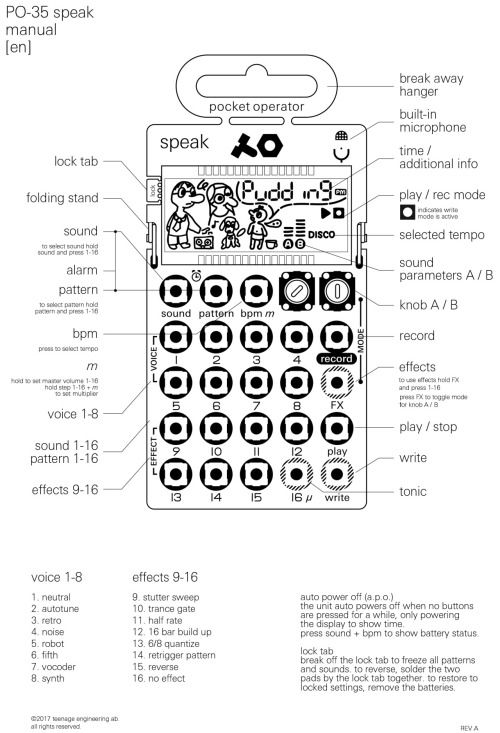


At the heart of the interface, you'll find the 16 Program buttons, used to sequence patterns and play notes. Surrounding these are function buttons, such as Play/Pause, Record, and various mode selectors. The LED indicators provide visual feedback for currently activated functions.
Program Buttons
The Program buttons are the core of your Pocket Operator, used to create sequences and play notes. Each button corresponds to a specific track - such as Bass, Chord, Leads, or Drums - allowing you to build layered and complex patterns.


To create a sequence, simply press a Program button repeatedly to input a note. You can adjust the pitch by holding down the buttons and turning the encoder knob. Once you've created your pattern, the device will automatically loop it, allowing you to develop and layer complex melodies and beats.
Function Buttons
The function buttons give you full control over your Pocket Operator's capabilities. The Play/Pause button activating and deactivating the sequencer, while Record allows you to capture your creations and overdub new layers.
The Mode buttons, such as Run/Step and Swing/Tempo, offer advanced functionality. For instance, Run/Step mode lets you manually play each note in a sequence, while Swing/Tempo adjusts the timing of your patterns for a more human feel.


Mastering Pocket Operator Language
Once you've wrapped your head around the interface, it's time to dive into the unique language of Pocket Operators. This language, based on symbols and abbreviations, makes it easy to understand and edit your work efficiently.
A thorough understanding of this language will unlock your device's true power. With it, you'll be able to edit and manipulate your patterns with ease, creating intricate and emotional tracks that showcase your creativity.
Symbols and Abbreviations
Pocket Operators use a specific set of symbols and abbreviations to represent various functions and parameters. For example, 'F' denotes a filter, 'M' represents the mod wheel, and '#' indicates an Off-beat accent.


कारीयेछपाईèces like 'P' for Pitch, 'B' for Bend, and 'S' for Sustain will become your new best friends as you explore the depths of your Pocket Operator. By familiarizing yourself with these symbols, you'll be able to quickly edit and modify your tracks to achieve the perfect sound.
Editing Patterns
Editing patterns in Pocket Operators is an intuitive and enjoyable process. Using the Edit button, you can specify the track and step you want to modify. Once selected, use the Encoder knob to adjust the desired parameter, indicated by the currently displayed symbol.
For instance, to increase the decay time of a hi-hat, you'd press Edit, select the Hi-Hat track and the appropriate step, then turn the encoder to adjust the 'D' parameter. With a bit of practice, you'll find that Pocket Operators encourage experimentation and rarely limit your creative potential.
Talks and Tips for Pocket Operator Users
With a solid grasp of the interface and language, it's time to delve into some advanced techniques and tips that set Pocket Operators apart from other sequencers. Let's explore how to get the most out of your device and unlock its hidden features.
This section is designed to inspire and challenge you, helping you grow as a musician and push the boundaries of what's possible with Pocket Operators.
Chaining Patterns
One of the most powerful features of Pocket Operators is their ability to chain patterns together seamlessly. By using the 'Next' and 'Chain' functions, you can create complex and dynamic performances that keep listeners engaged.
Chain large sections of your track or quickly switch between loops for an improvisational live set. With a bit of planning, you can create intricate compositions that reveal new layers and surprises with every listen.
Unlocking Hidden Features
Pocket Operators are packed with hidden features and secret modes that reward curious users. By exploring the depths of your device, you'll discover new sound sources, unique effects, and unexpected functionality.
For example, some models contain hidden drum kits and synthesis algorithms, while others boast advanced arpeggiation and chord generation capabilities. Spend some time experimenting with your device, and you'll undoubtedly uncover features that will inspire your creativity and take your tracks to the next level.
Embrace the unique language and intuitive interface of your Pocket Operator, and watch as your musical abilities grow. With this guide, you now possess the essential foundation needed to create captivating beats and melodies using your Pocket Operator. So, plug in your headphones, crank up the volume, and let your creativity run wild. Happy Sequencing!